Here you can see some examples for simple queries using the properties of a wiki page. This functionality is provided by the bundled extension Semantic MediaWiki. You can add these queries to any wiki page.
Content droplet "Data query"
Starting with BlueSpice 4.3, basic SMW data queries can be added directly with the Content droplet "Data query":
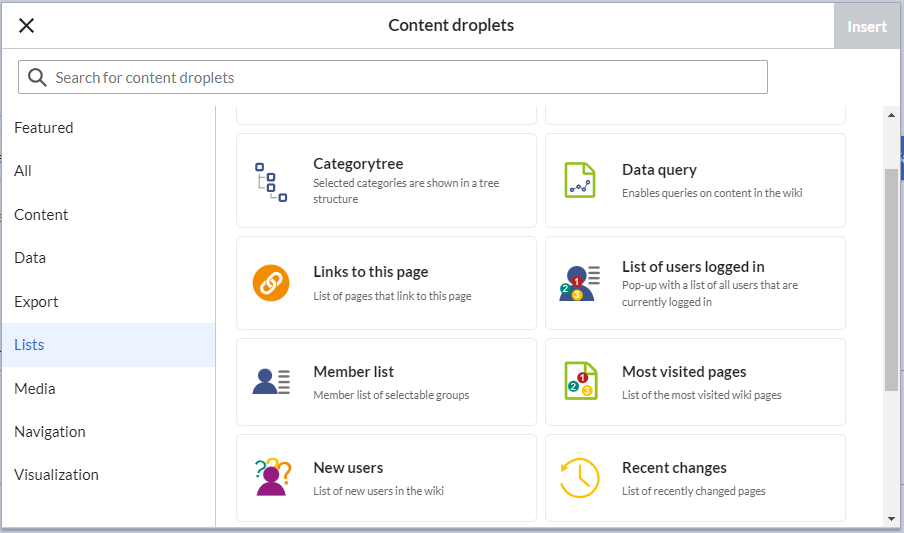
- Click on the Content droplets menu item in the visual editor.
- Select Data query under Lists.
Content droplet "Data query" - Click Insert. This opens the droplet inspector.
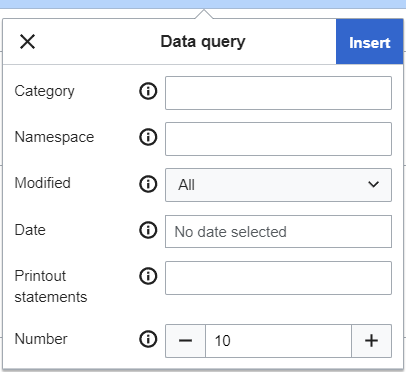
- Fill in the query options (parameter). Each setting has a tooltip that explains exactly what values you can enter.
Data query parameters - Click Save.


The list of filtered pages is then displayed on the wiki page.
Creating page lists manually
If you need more flexible, customizable queries, you can add the queries directly in source edit mode. Below are a few examples to get you started.
Show pages in a particular namespace
{{#ask:
[[:+]]  <!-- find all pages in the main namespace -->
[[Modification date::+]]<!-- necessary to filter deleted pages -->
|format=ul
|limit=4
}}
Output example in list style format:
{{#ask:
+Modification date::+ |format=ul |limit=4 }}
Notes:
[[:+]]shows pages from the Main namespace.[[Myspace:+]]shows pages from the namespace Myspace.[[:+||Help:+]]shows pages from both the Main namespace and the namespace Help (=OR argument)
Output in category style
{{#ask:
[[:+]][[Modification date::+]]
|format=category
|limit=12
}}
+Modification date::+ |format=category |limit=12 }}
Show pages from a category
{{#ask:
[[Category:Administration]]
| limit=4
| searchlabel=
| format=ol
}}
| limit=4 | searchlabel= | format=ol }}
Combine categories
OR operator:{{#ask:
[[Category:Administration]] OR [[Category:Bearbeiten]]
| limit=10
| searchlabel=
| format=ol
}}
Pages from main category (without subcategories)
{{#ask:
[[Category:Administration|+depth=0]]
| limit=10
| searchlabel=
| format=ol
}}
| limit=10 | searchlabel= | format=ol }}
Subcategories of a page
{{#ask:
[[Subcategory of::Administration]] [[Modification date::+]]<!-- nötig um gelöschte Seiten u. Redirects zu filtern -->
|format=ul
}}
Output of the subcategories of the category "Administration" {{#ask: Subcategory of::Administration Modification date::+ |format=ul }}
Pages that start with the same page name string
{{#ask:
[[~Visu*]][[:+||Manual:+]]
[[Modification date::+]]<!-- necessary to filter deleted pages -->
| limit=5
| searchlabel=
| format=ol
}}
{{#ask: ~Visu*|Manual:+ Modification date::+ | limit=5 | searchlabel= | format=ol }}
Results format: Table
Format "broadtable"
{{#ask:
[[~Visu*]][[:+||Manual:+]]
[[Modification date::+]]<!-- necessary to filter deleted pages -->
| limit=5
| searchlabel=
| format=broadtable
}}
{{#ask: ~Visu*|Manual:+ Modification date::+ | limit=5 | searchlabel= | format=broadtable }}
Format "table" with filter (datatable)
{{#ask:
[[~Visu*]][[:+||Handbuch:+]]
[[Modification date::+]]<!-- necessary to filter deleted pages -->
| limit=5
| searchlabel=
| format=table
| class=datatable
}}
{{#ask: ~Visu*|Manual:+ Modification date::+ | limit=5 | searchlabel= | format=table | class=datatable }}
Date queries
Today
{{#ask:
[[QM/Approval date::>>{{#time:Y-m-d|now -1day}}]]
}}
Before or after
{{#ask:
[[Modification date::<{{#time:Y|2024}}]] [[:+]]
|?Modification date#-F[Y]
|format=ul
|headers=hide
}}
Search operators
If you want to look for results in a particular range, you can use search operators. See: https://semantic-mediawiki.org/wiki/Help:Search_operators#comparators
Templates
Customized output formats can be created using templates. The documentation for this can be found at semantic-mediawiki.org.
Here we show you some useful tips when working with templates.
Suppressing the namespace prefix
{{#ask: QM:+Modification date::+
|format=plaintext
|template=mytemplate
|link=none
 }}
*[[{{FULLPAGENAME:{{{1}}}}}|{{PAGENAME:{{{1}}}}}]]